Run every client's store from one inbox.
Agents fulfil, answer, restock and scale what's working across every client's store — asking you first where you want, on autopilot where you allow. Every action lands in the client's ledger with who approved it.
Free for one store · 14-day trial on paid plans · no card
Mixed portfolios welcome. Connect every client's store, whatever it runs on.
Every tool also speaks MCP — ask in ChatGPT or Claude, and anything that changes a store still stops for your sign-off.
Shopify, WooCommerce, Shopware and every account around them — one typed catalogue, scoped per store. All integrations
Four datavessel agents audit our Google Ads every morning — performance, week over week, wasted spend — with the fixes already proposed. Anything touching budget waits for approval; the rest just runs. It's the first tool that doesn't just report. It works.
 Machinery business · Shopware store · allaoui.de ↗
- 4 scheduled agents, weekdays 09:00
- Google Ads · GA4 · Search Console
- Budget changes ask first, the rest on autopilot
- Customer since March 2026
You set the rules. Agents do the work. You keep the receipts.
One inbox, every store
Orders, refunds, tickets, stock and ad events from all your clients arrive in one stream, tagged by store.
A policy decides how each event is handled
When an event matches your conditions, the policy runs what you wrote: a fixed store action, an agent, or both in order — with the sign-off you chose. Nothing runs outside a policy.
Agents do what a fixed step can't
Where a fixed step isn't enough, an agent reads the context and proposes the action — asking you first, or on autopilot where the policy allows it. Never on its own terms.
Everything lands in the ledger
Action, amount, approver, transcript. Filtered per client, exported as the monthly report.
Built so client data never mixes.
Agencies live on trust. So the model is strict: a client groups stores, a store owns its policies and its linked accounts, and the executor refuses to use anything that isn't linked to the store it's working on.
Clients
Who you run stores for. A client can own several stores — an EU and a US storefront, two brands. Clients are free; plans count stores.
Stores
The unit of isolation. Every policy, agent, run and ledger row belongs to exactly one store. Switch the inbox or the ledger to a client and you see its stores and nothing else.
Linked sources
Connect Google once; then link each GA4 property, Search Console site and Ads account to the store it belongs to, or mark it shared. An agent on Northwind can only reach Northwind's sources — if none is linked, it stops and says so rather than guessing.
Reports run per client — unified across its stores, or broken down store by store.
Agents do the work. Your policy says when, where and how far.
A policy is a store event or a schedule, a set of conditions, and the steps to run. Direct steps are fixed store actions — approve the refund, pause the ad group, notify Slack. An agent step is for the work that needs reading the context — the order, the ticket, the page — and you choose per step whether it asks you first or runs on autopilot.
- Scoped per store. Every policy belongs to one store. A Northwind rule can never touch Bluefin — not its orders, not its ad account, not its analytics.
- Fire controls. Per event or in batches, debounced, capped per hour — the knobs an operator actually needs.
- Schedules too. “Weekdays at 09:00, sweep inventory” is a policy like any other.
- Suggested, not forced. datavessel proposes policies from what you keep approving. They stay paused until you say so.
The store busywork, across every client.
Each agent ships with the tools it needs on Shopify, WooCommerce and Shopware — plus Google Ads, Meta Ads, GA4, Search Console, Merchant Center, Tag Manager, Slack, Klaviyo and HubSpot. Deploy one per store, attach a policy, pick ask or autopilot.
Default modes shown — every step is yours to set per store. 200+ typed tools, built on MCP.
Every action, every amount, every approver — per client.
Nothing changes without a row in the ledger — on the store or on the accounts around it: a refund, a fulfilment, an ad group paused, a ticket answered, a page published. What ran, on which client's store, for how much, and whether you, a policy or an agent on autopilot signed it off. Reads aren't listed; the ledger is a record of changes, not of looking.
- The work you never saw. Above the rows: how many events arrived, how many were handled without you, how many came to you, how many duplicates were prevented.
- Filter by client. Pick a store and the ledger becomes that client's book — every row, total and report scoped to them.
- Monthly report in one click. Value handled, refunds, blocked fraud, actions by category — exported per client for the review call.
- Transcript on record. For agent steps, the reasoning and tool calls are kept with the row.
Approve or deny. From anywhere. That's the whole app.
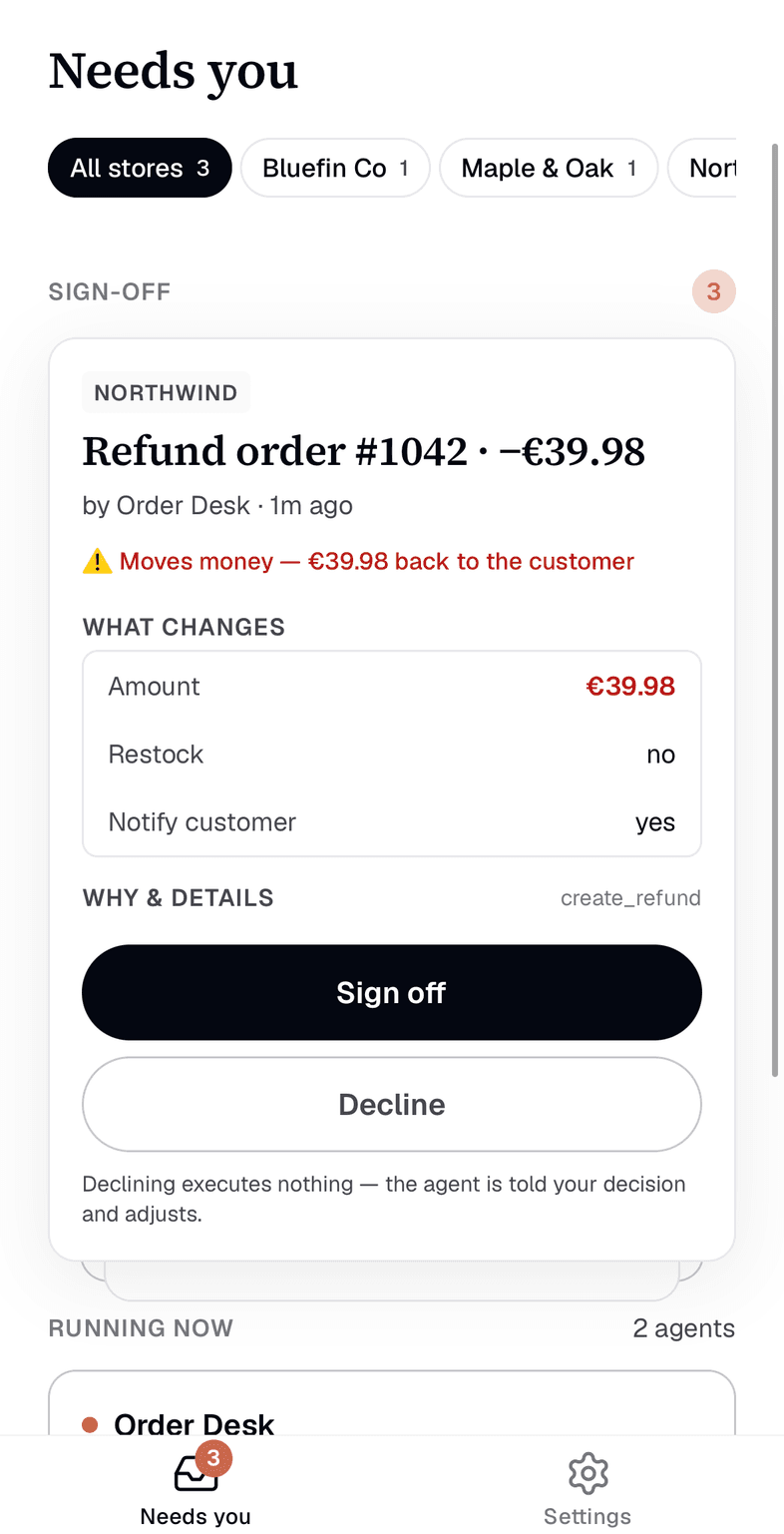
The mobile app is the sign-off lane and nothing else: the items across all your stores that need a human, the context, the proposed action, two buttons. Policies and agents keep running while you're out; what needs you waits for you.
Push on every new sign-off, and an email digest if something sits unanswered — so nothing quietly waits. Same ledger, same audit trail.
Claude, GPT or Gemini — bring your own key. Your data, your spend, no markup.
Clients group stores; each store links its own GA4, Ads and support accounts. An agent working on a store can only use that store's sources — enforced when the tool runs, not by prompt.
Refunds, cancellations, budget changes default to ask. Autopilot is opt-in, per step.
Stop running ten stores by hand.
Connect the first client's store, attach a policy, approve the first run. Free for one store; agency plans from the second. No card to start.